The Future of Data Processing: How Vibe Coding in Data.olllo Turns Natural Language Into Instant Automation
12/5/2025
The Future of Data Processing: How Vibe Coding in Data.olllo Turns Natural Language Into Instant Automation
Cleaning and processing data should be simple. But for most people, it’s not.
CSV files come in messy. Columns need cleaning. Dates need fixing. Numbers need converting. Charts need generating.
And unless you’re fluent in Excel formulas or Python scripts, the process can be slow and frustrating.
This is where Vibe Coding in Data.olllo changes everything.
Instead of writing formulas or code, you describe what you want — and Data.olllo instantly generates clean, ready-to-run transformations. It understands your data, knows the context, and applies real operations on your dataset.
Just type a sentence. The rest is automated.
What Exactly Is Vibe Coding?
Vibe Coding is Data.olllo’s natural-language-driven way of doing data operations. It feels like talking to your data.
You type something like:
“Clean the price column, convert it to numbers, and show me total revenue by day.”
Data.olllo responds with real pandas or plotly code, tests it on a sample of your dataset, and instantly displays:
- Cleaned data
- Calculated metrics
- Charts
- Previews
No code visible unless you want to see it. No confusing formulas. No errors from manual operations.
It’s the most intuitive way to work with your data — especially when paired with workflows.
Why Traditional Data Processing Slows You Down
Even simple datasets often require:
- Manual cleanup
- Repetitive transformations
- Merging or filtering
- Fixing broken values
- Creating charts
- Exporting cleaned versions
Doing it manually can cost minutes — or hours — every time. Writing code requires knowledge and debugging.
Vibe Coding eliminates both barriers. You simply describe the output you want. Data.olllo produces a consistent, error-free result.
The Magic: You Write the Intent, Data.olllo Writes the Code
Let’s say you import a messy CSV with inconsistent date fields, text-based numbers, empty columns, and unformatted totals.
You type:
“Fix the dates, clean the empty columns, convert prices to numeric, and show daily revenue with a line chart.”
Data.olllo:
- Understands your dataset
- Determines required steps
- Generates precise pandas code
- Runs it safely on a sample
- Shows the result instantly
- Lets you apply it to the full dataset
You become a data engineer — without being one.
Interactive, step-by-step Vibe Coding (new)
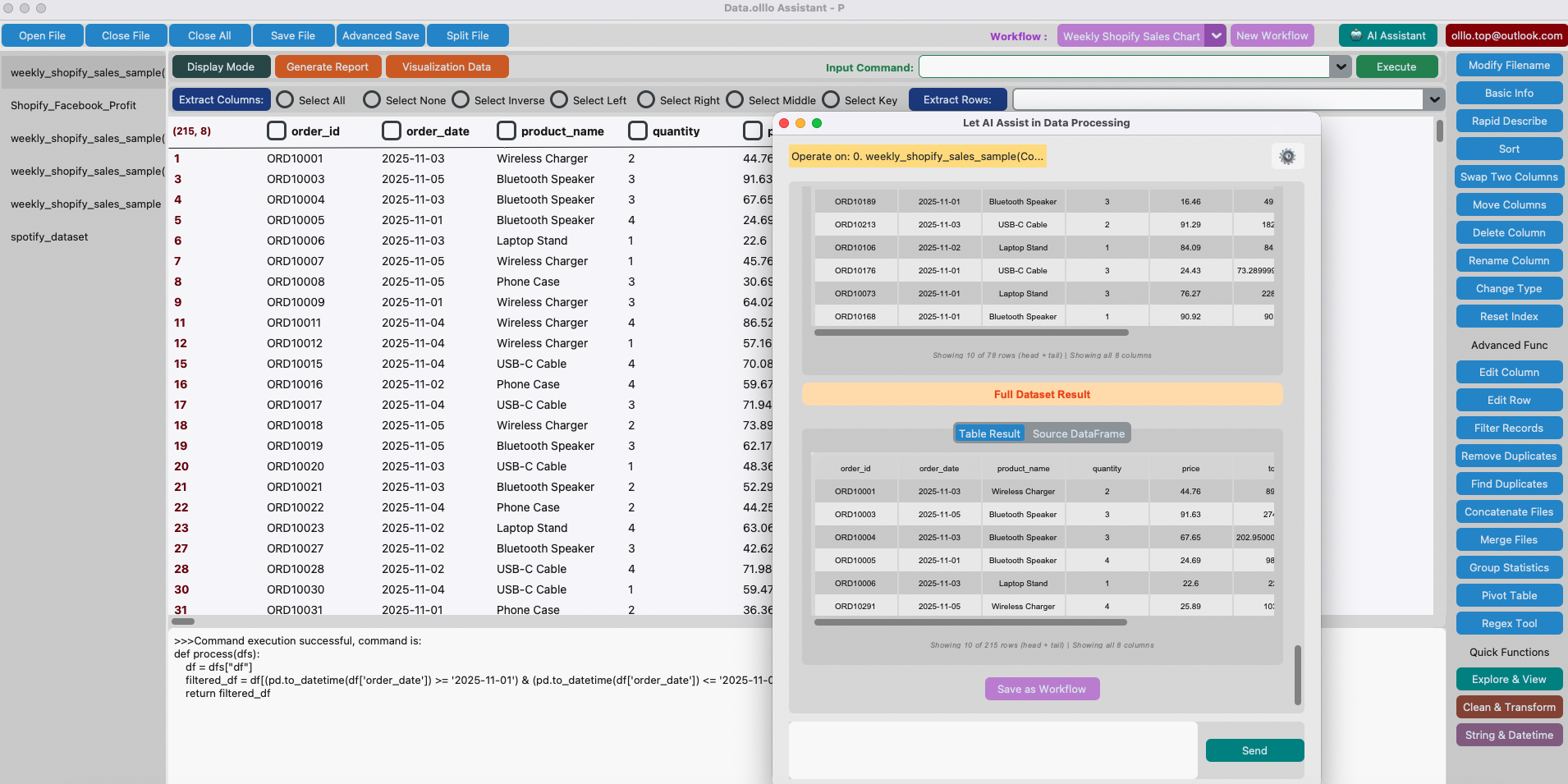
Data.olllo’s AI Assistant doesn't just run a single instruction and stop. It supports incremental, step-by-step natural-language operations that mirror how people actually work with data.
For example:
-
You ask: “Group by product.”
- The assistant generates the code to group the sample dataset by
product, runs it on a sample, and shows you the result dataframe. - If you confirm, you click Run on full dataset and Data.olllo applies the same code to the entire file, returning the full result dataframe.
- The assistant generates the code to group the sample dataset by
-
Next you ask: “Calculate total sales.”
- The assistant generates the next transformation (summing sales), runs it on the sample/grouped result, and previews the updated dataframe.
- Confirm again to apply on the full dataset.
Each step is a small, safe interaction: generate → preview (sample) → confirm → apply (full dataset).
When you’re happy with the transformed result, click New Workflow, select the final result dataframe, and save the whole sequence as a reusable workflow. Later you can run that workflow on new exports with one click.
This incremental approach keeps errors small, makes transformations explainable, and preserves the exact sequence of steps for future automation.
A Real Example: Clean, Analyze, and Visualize in One Sentence
Imagine you have a dataset of weekly orders.
You type:
“Group by product, calculate total sales, and plot the top 10 items.”
In seconds Data.olllo shows:
- A cleaned dataset
- A grouped summary
- A top-10 bar chart
- Export options
- A button to save the whole thing as a workflow
One natural-language instruction → full data analysis pipeline.
Building Workflows With Vibe Coding (The Secret Power)
The combination of Workflows + Vibe Coding is where Data.olllo becomes a true automation engine.
How it works:
- Load your dataset
- Use Vibe Coding to clean & transform (step-by-step)
- Add calculations or charts
- Save the entire process as a workflow
- Reuse it next time with one click
Next week or next month, you can load a new dataset and press:
Run Workflow → Apply
Everything replays automatically — using the same AI-generated code.
What Tasks Are Perfect for Vibe Coding?
Almost anything you do in Excel or pandas:
Data Cleaning
- Fix broken column types
- Normalize dates
- Remove duplicates
- Handle missing values
- Clean currency, percentage, or rating fields
Analysis
- Group and aggregate
- Calculate metrics
- Create summaries
- Split by categories
- Extract insights
Visualization
- Line charts
- Bar charts
- Pie charts
- Scatter plots
- Histograms
Export
- Clean CSV
- Summary sheet
- Report-ready data
The more natural your request, the better.
Example: A Full Vibe Coding Workflow (Real Scenario)
You say:
“Clean the dataset, calculate profit, show revenue, orders, and top products, and save everything as a reusable workflow.”
Data.olllo:
- Cleans the columns
- Runs conversions
- Calculates profit
- Generates charts
- Shows interactive previews
- Lets you export
- Allows you to save the whole thing as your Profit Analysis Workflow
Next time you only upload the new CSV and press a single button.
Bonus: Continue Working on the Result
One of Data.olllo’s hidden superpowers: After a workflow completes, you can keep going.
Load the result → Ask more questions.
Example:
“Now show profit by channel and generate a stacked bar chart.”
Instantly done. You can save this as Workflow v2.
Iterative analysis has never been this smooth.
Final Thoughts: Vibe Coding Is the New Way to Work With Data
Data processing used to be:
- Slow
- Technical
- Error-prone
- Repetitive
With Vibe Coding, it becomes:
- Natural
- Instant
- Automated
- Reusable
You focus on what you want — Data.olllo handles how to do it.
This is the future of data processing. Not formulas. Not scripts. But conversations that turn into workflows.