The 3-Minute Weekly Sales Workflow: How to Clean, Analyze, and Reuse Your Shopify Export Automatically
11/28/2025
The 3-Minute Weekly Sales Workflow: How to Clean, Analyze, and Reuse Your Shopify Export Automatically
Every Shopify seller knows the pain:
You download the same weekly sales export, open it in Excel, and spend the next 30–60 minutes doing the same repetitive cleanup steps — delete empty columns, fix date formatting, convert prices, calculate totals, make charts…
It’s a predictable routine, but still incredibly time-consuming.
And worst of all — you have to do it again next week, and the week after that, and forever.
If that’s you, this guide shows you how to eliminate the busywork and build a 3-minute automated workflow using Data.olllo.
No code, no formulas, no spreadsheet crashes.
Why Weekly CSV Cleanup Is So Time-Consuming
Even though the Shopify sales CSV has the same format each week, the cleanup steps are never trivial:
- Some columns are empty or irrelevant
- Prices come through as text instead of numbers
- Dates aren’t standardized
- You need to calculate daily revenue
- You want charts for a quick weekly review
- You export a clean version for bookkeeping or analysis
Doing these steps manually adds up — especially across 52 weeks per year.
Most small business owners don’t realize how much time this costs them.
What If Your Weekly Workflow Could Run Automatically?
This is where Data.olllo shines.
Instead of redoing the same work every week, you can:
- Clean and format the Shopify CSV once
- Generate your sales charts
- Save everything as a workflow
- Next week → click “Run Workflow” → load the new CSV → Apply → done
Your 45-minute weekly task becomes a 15-second process.
Step-by-Step: Build Your Shopify Weekly Sales Workflow
Here’s what the automated workflow handles for you:
1. Load your weekly Shopify sales CSV
Just open it by Data.olllo.
2. Clean formatting
Use built-in functions or AI assistant to clean automatically:
- Converts
order_dateinto a proper datetime - Converts price and total fields to numeric
- Removes unneeded columns
- Filters out test or cancelled orders
3. Add meaningful calculations
Use built-in functions or AI assistant to calculate automatically:
- Daily total revenue
- Daily total number of orders
- Average order value (AOV)
- Top-selling products
4. Generate charts automatically
Use built-in functions or AI assistant to generate charts automatically:
- A revenue over time line chart
- A top 10 products bar chart
No manual plotting needed — charts update instantly each week.
5. Export a clean, ready-to-use report
You can export:
- A cleaned CSV
- A summarized sheet
- Or both
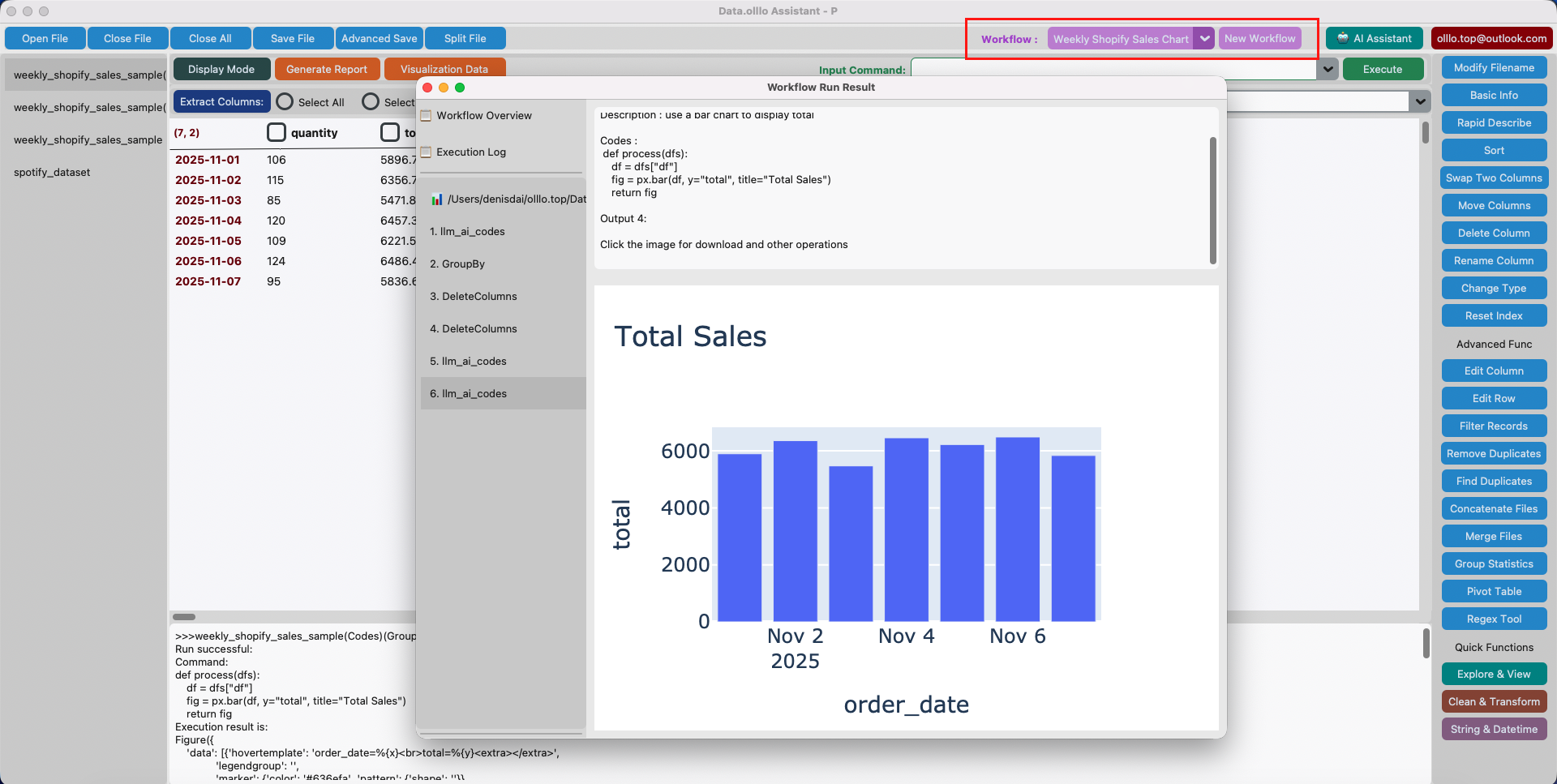
6. Save Your Workflow Once — Use It Forever
Click the New Workflow button and save it with a name:
Weekly Shopify Sales Report
Next week:
- Download Shopify CSV
- Open Data.olllo
- Run your saved workflow
- Enjoy instant charts and insights
Once you’ve saved the workflow, you can run it again and again:
You don’t have to maintain formulas, clean columns, or redo analysis.
The structure of Shopify’s export stays the same — which means the workflow works every time.
What This Workflow Saves You (Every Week)
- 30–60 minutes of manual cleanup
- Frustration dealing with inconsistent formatting
- Rebuilding charts or summaries
- Worrying about breaking Excel formulas
- Stress from repeating the same task endlessly
In one year, this workflow alone saves you 40+ hours — an entire week of full-time work.
Bonus: Continue to operate on the result from workflow running
If one week your want more insights, you can continue to operate on the result from workflow running.
- Import the result after workflow running
- Ask the built-in AI assistant:
“Show me more insights base on profit.”
It will continue to operate on the result and you can do the same to save a new version if needed.
Final Thoughts: A Small Automation With a Massive Impact
Your weekly Shopify sales export should not be a source of stress.
With Data.olllo, you turn a repetitive task into a fully automated, reusable workflow that gives you consistent insights — without touching Excel or writing code.
This is where Data.olllo’s power becomes obvious:
Automation for real people, real data, real business.
If you haven’t created your weekly workflow yet, this is the perfect place to start.